Library Pro
Set up Library Pro, organise your assets and reuse comps in After Effects.
Installation
Library Pro is an extension rather than a script, so it installs differently to the other tools. It arrives as a .zxp file, which After Effects cannot install on its own.
- 1
Close After Effects.
- 2
Download the latest Library Pro build from your dashboard.
- 3
If you don't already have it, install the aescripts ZXP Installer. It handles both installing and updating the panel.
- 4
Drag the Library Pro .zxp onto the ZXP Installer.
- 5
Open After Effects, then Window > Extensions > Library Pro. The first launch walks you through setup, covered next in First run.
First run
Open After Effects, then Window > Extensions > Library Pro. The first launch walks you through three things in order: the media tools, where your libraries live, and signing in. It takes a couple of minutes and only happens once, and nothing you choose here is permanent, you can change it all later.
Install preview tools
Press Install tools and let it run. It's ffmpeg, and it generates the video thumbnails, scrub previews and audio waveforms. One download per machine, and it survives Library Pro updates.
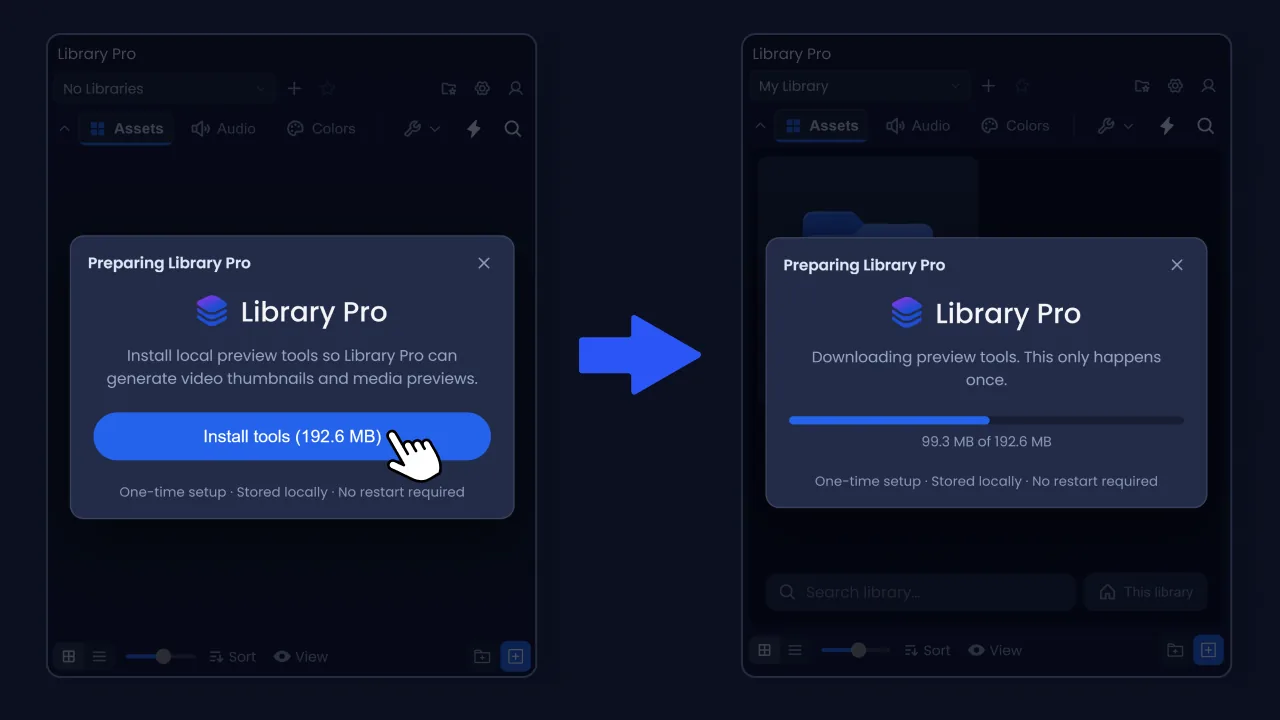
You can only skip it if the download fails. Do that and the panel still works, you just get no generated previews until you install them from Settings > Previews.
Where your libraries live
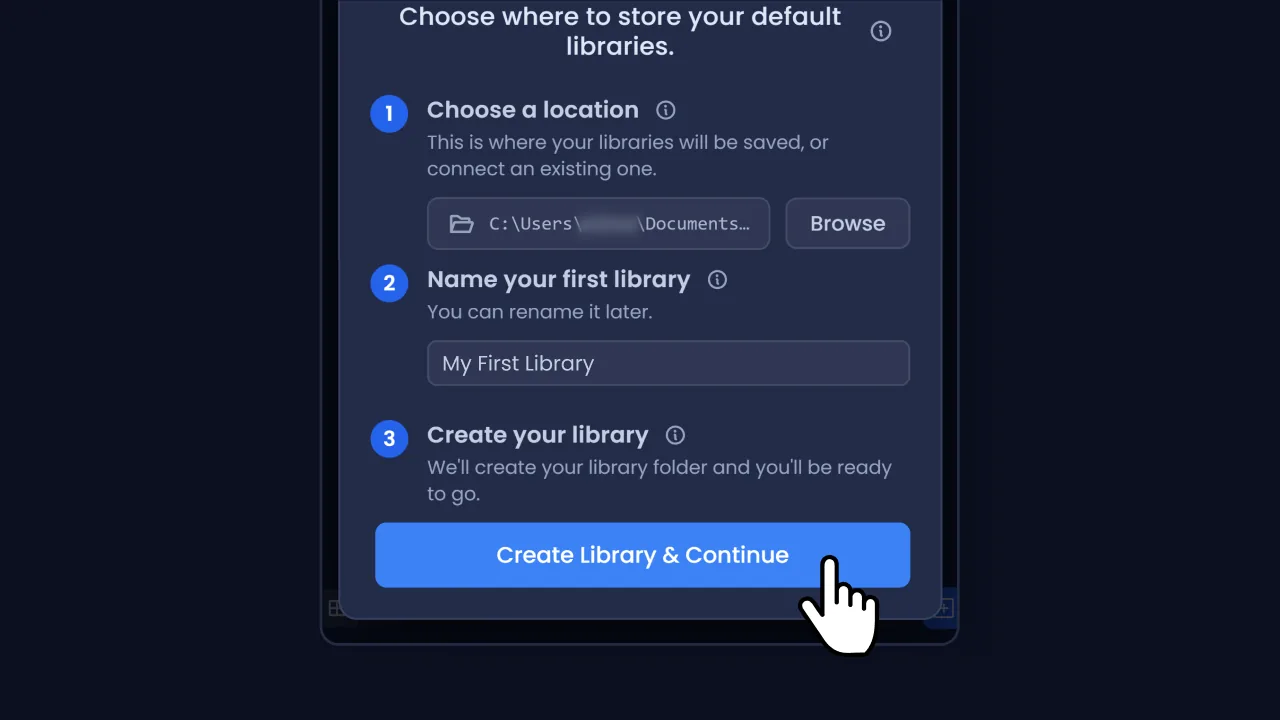
Next is the Welcome window.
- 1
Choose a location. This is the folder your libraries get created in. It defaults to a LibraryPro folder in your Documents. Press Browse to put it somewhere else.
- 2
Name your first library. Something you'll recognise, like a client or a project. You can rename it later.
- 3
Press Create Library & Continue.
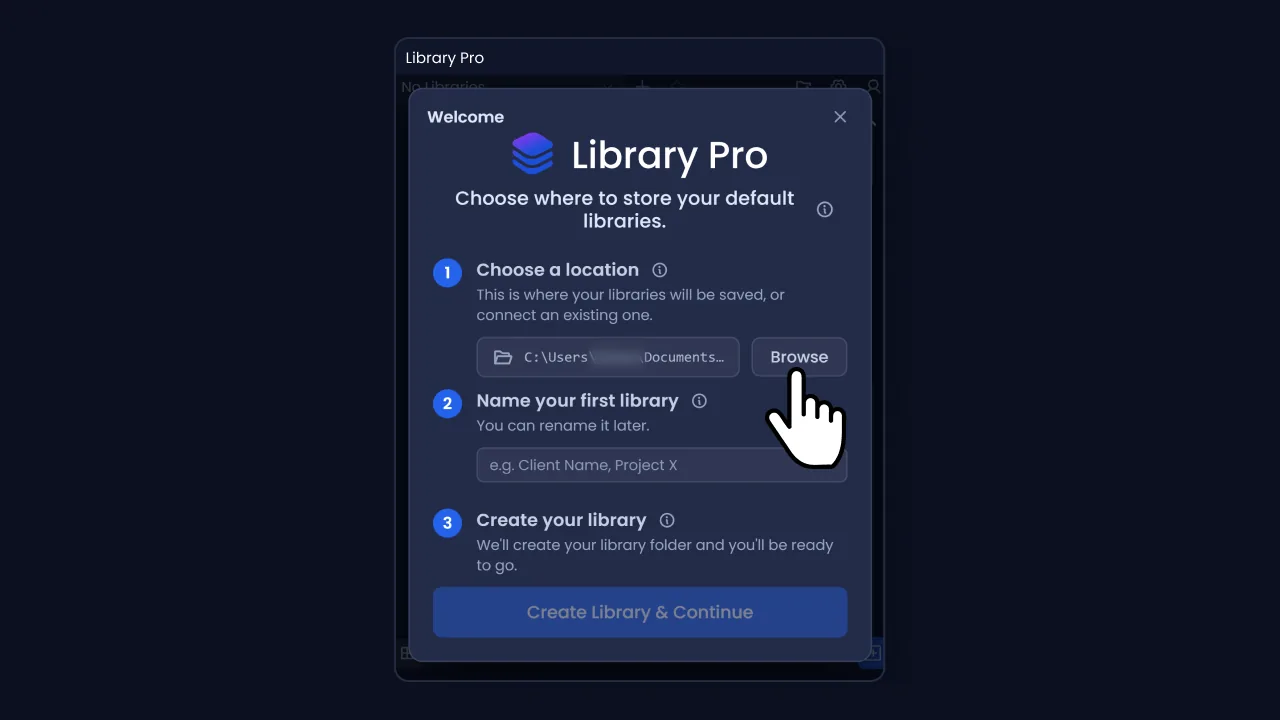
That default puts it on your system drive, and your files get copied into the library, so point it somewhere with room instead, ideally a fast SSD. An external drive is fine too, its libraries just show as Unreachable while it's unplugged.
Check the line under the folder picker, because it isn't always the folder you picked: if what you chose already has things in it, Library Pro makes a LibraryPro folder inside rather than treating everything there as libraries.
Point it at a folder that already holds libraries, from an old install or a backup, and it offers to reconnect them instead. Nothing new is created.
Signing in
The Account window opens by itself as soon as setup finishes.
Sign in with the same ToolsForMotion account you downloaded with. If you don't have one yet, use the Create an account? link, which opens the website in your browser.
Once you're signed in the window shows your account and No license. Press Start free trial.
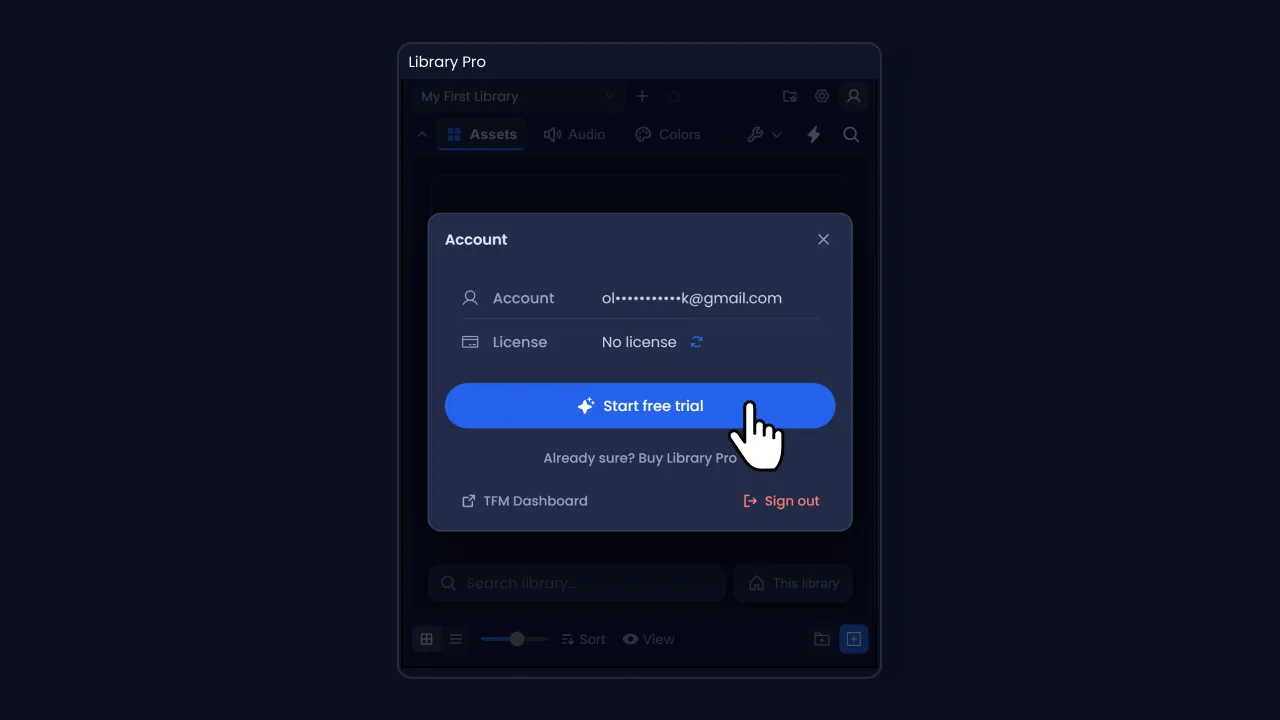
The trial is the full version for 14 days, with nothing held back and no card needed. It starts when you press the button rather than when you downloaded, so there is no rush between installing and getting round to it.
A trial runs on one machine. It binds to the computer you start it on, so start it on the one you actually work on rather than whichever you happened to install on first. If you need it moved, email support@toolsformotion.com.
If your account already holds a licence you'll see Activate this machine instead, and the panel binds this computer to your licence. Once it is active the Account window names the device and shows how many of your seats are in use.
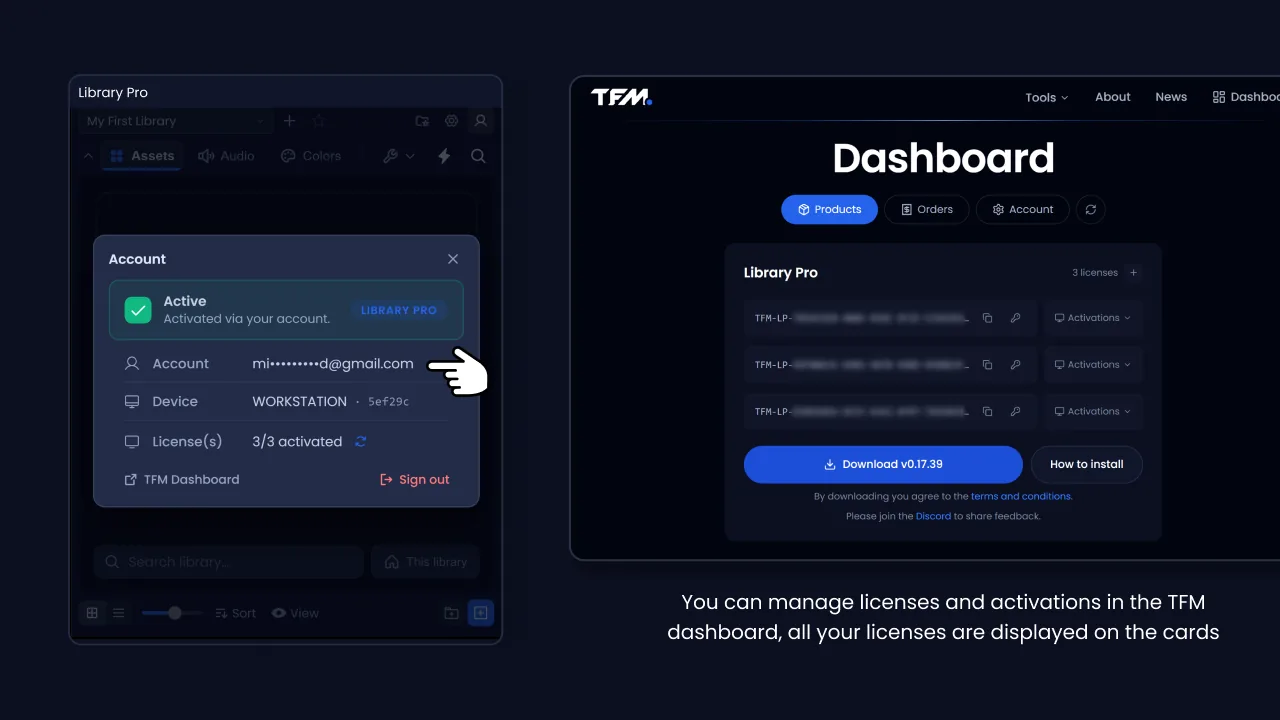
Licences and their activations are managed from your dashboard, where every key you own is listed on the product card.
The License key tab is the other way in: if someone gave you a key, a studio seat for example, paste it there instead of signing in.
You can close the Account window and look around first, though most features stay locked until you activate or start a trial.
That's the setup done. If you would rather watch than read, this walkthrough covers everything in the sections that follow, starting from the library you have just made. It's the same one as on the product page.
Updating
The same steps. Close After Effects, download the new build from your dashboard, drag it onto the ZXP Installer, then reopen After Effects.
You don't need to uninstall the old version first, and you won't have to sign in again.
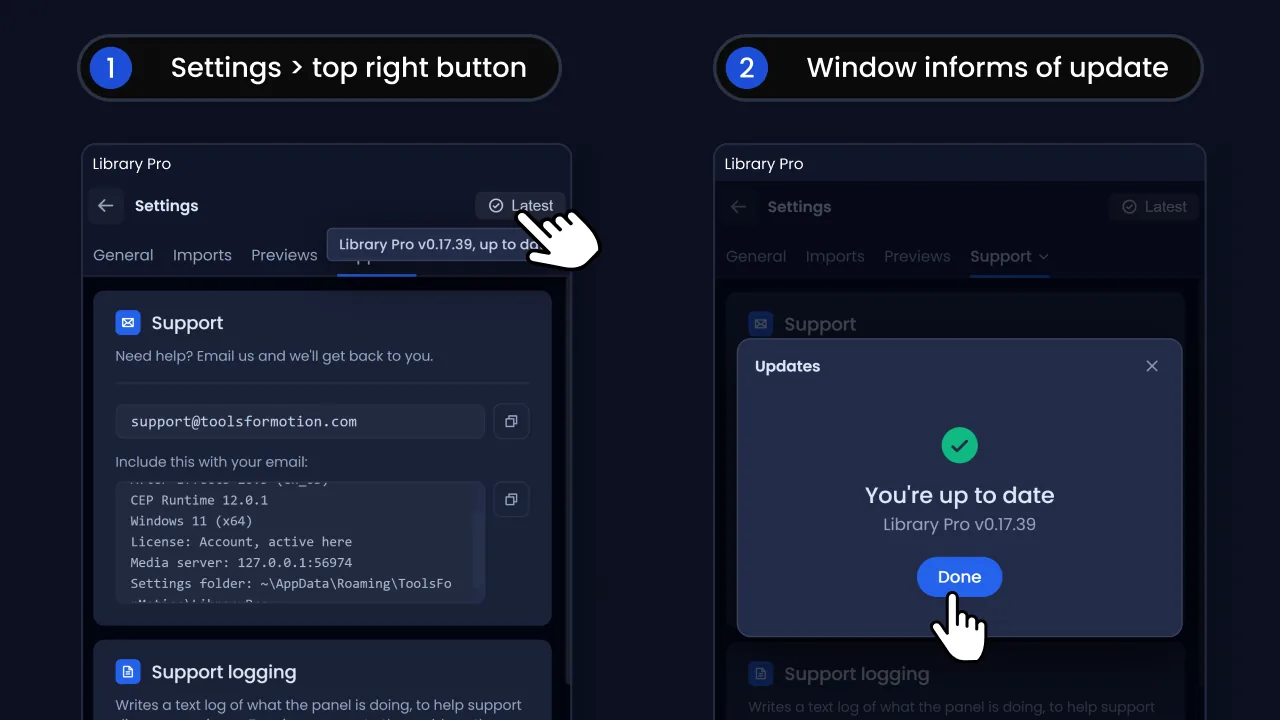
The panel checks when it opens and tells you if there's a new build. You can also check any time from the button in the top right of Settings, which shows whether you're up to date. Neither downloads anything, both send you to your dashboard.
How Library Pro works
Library Pro keeps your reusable work in ordinary folders on a drive you choose, and gives After Effects a way to browse them without leaving the app.
Everything lives behind three tabs at the top of the panel, called shelves.
- Assets: comps you've saved, video, images, vector artwork and 3D models
- Audio: music and sound effects, with waveforms and playback in the panel
- Colors: colour palettes you apply straight onto layers
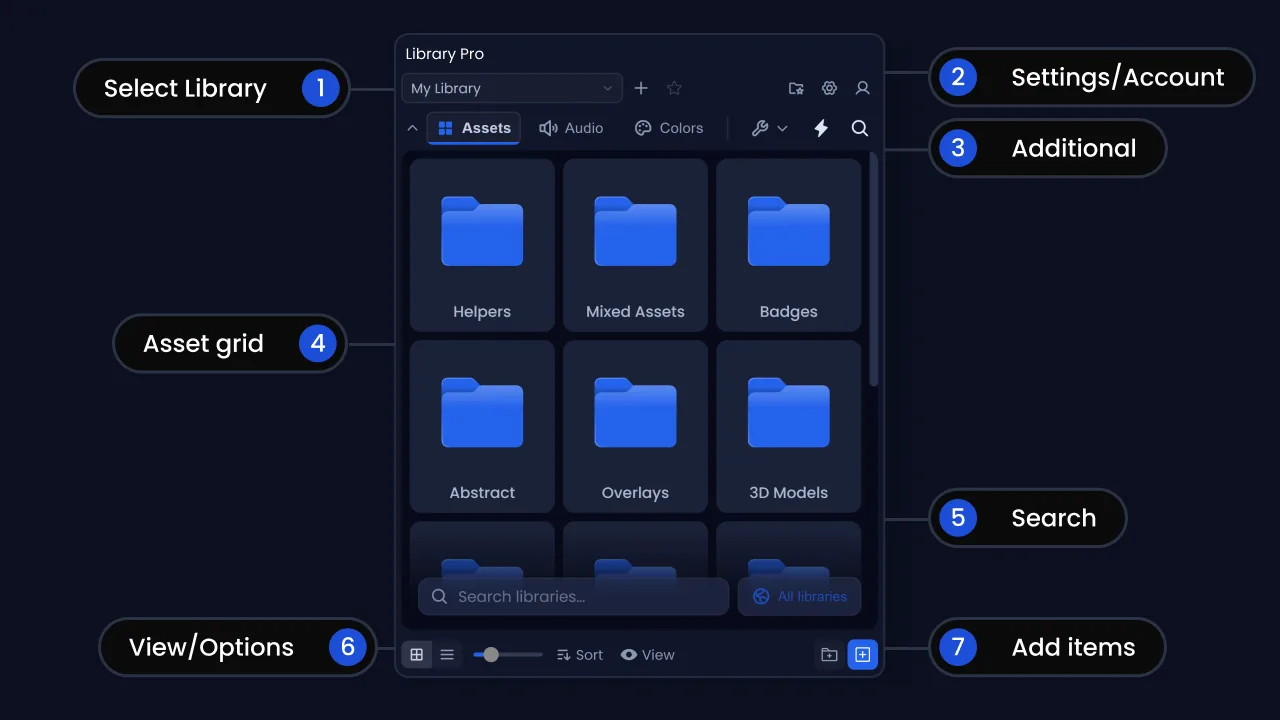
Each shelf has its own folders, view settings and contents. Panel space is tight, and you're rarely adding music at the same point in a job as footage, so splitting them keeps each one uncluttered.
Saved comps are assets
There's no separate shelf for compositions. Save one and it becomes a single item on the Assets shelf, in whichever folder you had open at the time, with a COMP badge in the corner. You can preview, rename, move and delete it exactly like a video or an image.
Library Pro handles the packaging, so you don't have to think about it. Once a comp is saved you can import it into any project whenever you need it, and its footage comes with it.
An .aep you copied in yourself badges AEP rather than COMP, and carries a warning triangle. See Assets for what that means.
Files are copied in, never linked
Adding a file to a library copies it. The original stays exactly where it was, untouched. Your library is self-contained, so it survives you tidying up your downloads folder.
A file in your library is either the whole thing or it isn't there at all. An interrupted copy can't leave you with half a file that looks fine.
Your libraries are just folders
Open one in Finder or Explorer any time. Nothing is hidden in a database. You can put a library on a local disk, a NAS, or a synced folder like Dropbox, and you can back it up by copying the folder.
Previews are the exception. They're generated per machine and kept outside your libraries on purpose, so they never sync and never bloat a shared folder. Deleting them is safe, they rebuild as you browse.
Libraries and locations
- A location is a folder that holds libraries. You pick one during setup and can add more.
- A library is one folder inside a location. It's the thing you switch between in the dropdown at the top of the panel.
A location can't sit inside a library, and a library isn't a location. If you point Library Pro at a folder that breaks that rule it tells you which mistake you made and, where it can, offers the folder you probably meant instead.
Making and switching libraries
The dropdown at the top left of the panel lists every library it can see, grouped by location when you have more than one. Click one to switch. The + button beside it opens the New Library window: give it a Name, pick a Location if you have several, then press Create Library.
Adding a second location
Settings > General > Additional Locations > Add Location. Use this to pick up libraries that live somewhere else, like a shared drive or a NAS.
Disconnecting a location only stops Library Pro looking there. Your files stay on disk and you can add it back whenever you like.
Renaming, reordering and deleting
The folder-with-a-star icon in the toolbar opens Manage Libraries. Drag rows to reorder them, use the pencil to rename, and the bin to delete.
Every delete asks first. A library with anything in it asks you to type DELETE to confirm, then removes the folder and everything inside. Colours and text styles count as content, so a library kept only for palettes still asks. If you only want Library Pro to stop looking at a folder, disconnect the location instead, which leaves your files alone.
If a rename or delete fails, something else has the files open. Usually that's an After Effects project pulling from the library, or a Finder or Explorer window sitting on the folder. Close those and try again.
Star a library
You can star one library. Hover a row in the dropdown and click its star. The star button in the toolbar then jumps straight to it from anywhere, and pressing it again returns you to where you were. Handy if you keep one library of things you use on every job.
When a library is unreachable
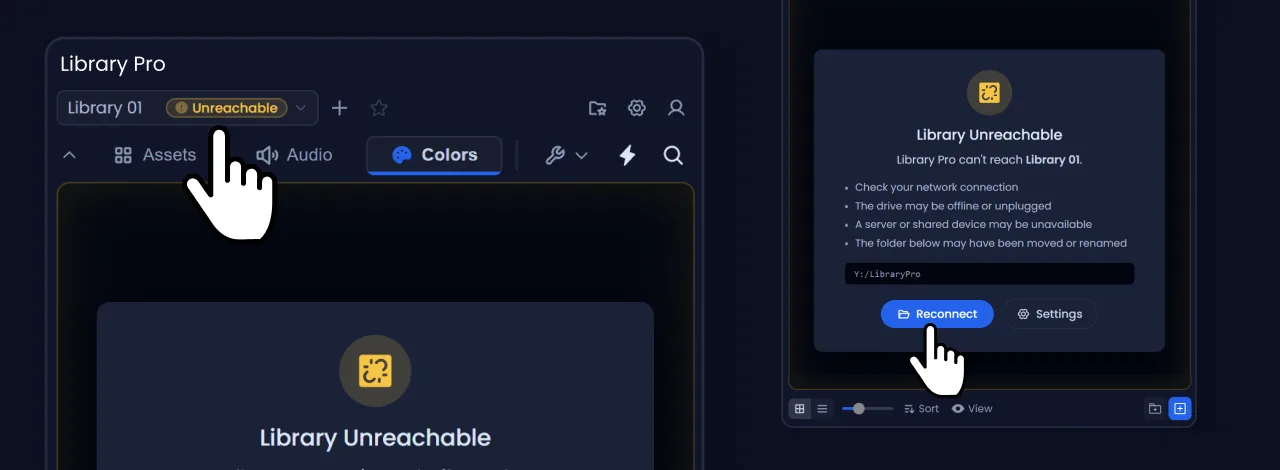
If a drive is unplugged, a network share is down or a folder got moved, the library still appears in the dropdown with an Unreachable badge. Select it and you get the recovery card, where Reconnect opens a folder picker so you can point the library at its new location.
A library in a cloud folder that hasn't finished syncing is different: it is still downloading, and appears on its own once it arrives. If it keeps happening, set that folder to stay available offline in your cloud app.
Getting around
Folders work the way they do everywhere else. Open one to go in, and the breadcrumb along the top of the shelf shows where you are.
The breadcrumb
The arrow on the left goes up one level. Every step in the trail is clickable, so you can jump straight back to any folder above you rather than climbing out one at a time.
A long path collapses in the middle and the hidden steps move into a menu, so the trail never pushes the current folder off the edge of the panel.
Each shelf remembers which folder you were in, per library. Switching away and back puts you where you left off.
Moving things
Drag anything onto a folder to move it in. This works for a single item or a whole selection.
To move something back out, drag it onto a step in the breadcrumb. It lands in whichever folder you dropped on, so you can go up one level or back to the root in a single drag.
Right-click and pick Move to... for the same job without the dragging. That one opens a folder tree, and the tree can move things into a different library entirely.
Adding files
Several ways in, and they all end up doing the same thing: the file is copied into the library folder, and your original is left alone.
Drag from Finder or Explorer
Drag files onto the panel. It shows Drop to import and adds them to the folder you're currently in. Drag and drop supports some formats that aren't listed in the file picker.
Folders work too. Drop one, several, or a mix of folders and loose files, and you get the review list below. A dropped folder keeps its own name.
The + button
Bottom right of the panel. On Assets and Audio it opens a short menu with From After Effects, From File and From Folder. From File opens a normal file picker, and From Folder takes one folder or several.
Those are two entries rather than one because the operating system cannot offer files and folders in the same dialog. Dragging takes a mix of both.
If everything you picked is audio while you're on the Assets shelf, the panel offers to put it on the Audio shelf instead.
From the After Effects project panel
Select something in your AE project panel, then choose From After Effects. A single comp opens the export dialog, covered in Saving a comp. Anything else gets added as footage.
Select several items, or a folder, and you get the review list below, so you can keep your AE folders as library folders and leave individual files out. Anything already in your library is flagged rather than skipped, so you can choose to replace it.
Dragging items straight out of the project panel does the same thing as the menu. A layered PSD counts as one file however many layers After Effects lists for it.
If the file you're adding lives outside your project folder, Library Pro offers to copy it next to your project and relink it first. There's a Remember my choice tick box, and you can change it later in Settings.
The review list
A zip, a folder, or a selection from After Effects all open the same window: a list of what is about to be added, grouped by the folders it came in.
- Everything is ticked to start with. Untick what you don't want and only the rest is added.
- Keep folder structure brings the folders across as library folders. Turn it off and everything lands in the folder you're looking at. It applies to one shelf at a time.
- Anything you already have is flagged and left unticked. Tick Replace files that already exist to overwrite them, and you're asked to confirm how many.
- Audio goes to the Audio shelf, images and video to Assets, each on its own tab. A tab's count is green when all of it is ticked and amber when only some is.
- Longer lists get a filter box. Type a few characters, untick what you find, clear the filter, and the tick stays.
Folders come first and keep their place. Where there are more files than there is room for, they collapse behind a Show 42 files line rather than dropping off the end.
Anything Library Pro can't add, like project files and documents, is left out of the list rather than offered and then refused.
Adding a zip
Drop a .zip onto Assets or Audio, or pick one through From File. You see what is inside before anything is added, and only what you ticked is unpacked.
Because the list is grouped by the archive's own folders, a pack of categorised sound effects arrives organised rather than loose. The progress message says whether it is unpacking or adding.
Adding a folder
Drag one or several in from Finder or Explorer, or use From Folder. Same review list, and the folder you dropped is the folder you get.
Nothing is copied twice on the way in, unlike a zip, because the files are already on your drive.
A big folder shows Reading folder with a Cancel. Nothing is added while it reads, so cancelling leaves your library exactly as it was. Dropping something enormous by mistake is a cancel rather than a wait.
Reading stops at 20,000 items and says so, rather than showing a list that is quietly incomplete. Folders nested too deeply for the panel to show are left out, the rest is still offered, and the message says which limit applied.
Copying large files
Anything over about 250 MB copies in the background so the panel stays usable, and you can cancel it from the progress bar.
Cancel stops the whole batch, not just the file in front of you. Nothing part-copied is kept, and nothing is added to the library for it.
Library Pro checks there's room before it starts, and tells you how much it needs against how much you have if there isn't.
When a name is already taken
Replace, Keep Both or Cancel, and one decision covers the whole batch.
Replace swaps the file but keeps its identity, so any After Effects project already pointing at it carries on working. Keep Both adds a number to the new one.
Only an exact match counts, name and extension both. Logo.png and Logo.jpg are treated as different files.
While a lot of files are being added
Big imports count up as they go, Adding 312 of 598 files, so you can tell the difference between working and stuck. That covers a zip, a folder, files dropped or picked from disk, and Add from After Effects.
One import runs at a time. Drop something while another is going and you get the no-drop cursor rather than a second list on top of the first.
The new files appear on the shelf before their thumbnails are made, so a few hundred images are usable while the previews fill in behind them.
When something cannot be added
Adding to After Effects used to be able to fail without a word, so the click just did nothing. You now get a reason.
The commonest one is adding a comp at the playhead while one of its own comps is open, which After Effects refuses because the comp would end up inside itself. Library Pro names both comps and asks you to open a different one.
Anything else shows After Effects' own explanation. If After Effects is simply slow to answer, it says so and suggests checking your project before trying again, since the import may still finish on its own.
Making folders
Use the folder button next to +, or right-click empty space and pick New Folder. Type the name and press Enter. Nothing is written to disk until you confirm it.
Rename anything by double-clicking its name. Moving things is covered in Getting around.
Select several items and right-click to get Group, which makes a new folder and moves them all in.
Deleting
Right-click and choose Delete. It removes the file from disk rather than sending it to the Recycle Bin or the Trash, so there's nothing to restore and no undo.
Unsupported files
A few things are turned away, with a short note telling you what was skipped and why.
- Project files (.aep, .aet, .prproj) can't be added directly. To add a comp, save it through Library Pro so its footage is collected with it.
- Templates made in Premiere Pro. After Effects cannot open those at all. Ones exported from After Effects are supported.
- EXR and HDR aren't supported.
- Anything that belongs on a different shelf, like dropping a video onto the Audio shelf.
Previews
Previews aren't made at import time, so a big file lands as fast as it can be copied. The preview renders afterwards, seconds for a short clip and a few minutes for a long one, and the card is usable the whole time.
Vector and GIF assets can be given a preview by hand. Right-click one and choose Add preview..., then pick a JPG, PNG or WebP.
Views and search
The bar along the bottom of the panel controls how the current shelf looks. Every shelf has the same controls, and anything that doesn't apply is greyed out rather than hidden.
Grid and list
The two icons on the far left. Assets and Colors open in grid, Audio opens in list.
The slider next to them sets card size on Assets and Audio, and column count on Colors, where dragging right gives you fewer, larger swatches. Grid and list remember their sizes separately.
Sort
Sort by Name or Date Added, ascending or descending. The Colors shelf also offers Manual, which is what it uses by default, so you can drag swatches into the order you want.
Folders always come first, whatever the sort.
View options
The View button opens the options for the shelf you're on. Every popup has a Reset in the corner that goes back to defaults.
- Assets: Show labels, Show file size, Background (Black, White or Transparent), and Thumbnail (Fit or Fill)
- Audio: Show labels, Show file size, Show waveforms, and Mark played tracks
- Colors: Show folders, Show add buttons, and Swatch shape (Square or Circular)
Show file size only applies in list view, so it greys out in grid.
These are per shelf but shared across every library, so setting them once is enough. Which folder you're in is remembered per library instead.
Search
The magnifier in the shelf bar shows the search field. Click it and start typing. There is no keyboard shortcut. Escape closes search and clears what you typed.
It matches on names, and on the names of the folders things sit in, so searching for a folder name finds everything inside it. Unnamed swatches match on their hex code.
The button beside the field cycles the scope: This shelf, This library, then All libraries. Results are grouped by shelf, and the buttons along the top filter to All, Assets, Audio or Colours.
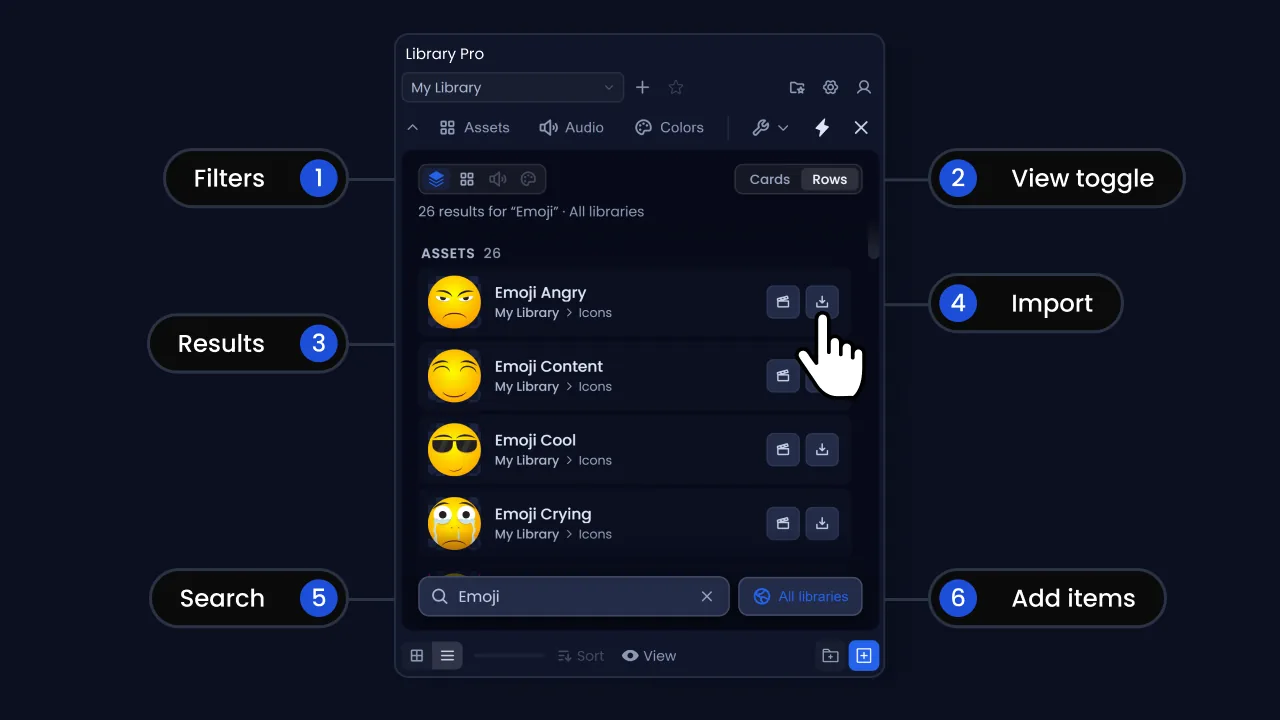
Right-click any result and choose Go to asset to jump to where it actually lives.
Selecting multiple items
Selection works the same on every shelf.
A plain click while you have a selection clears it. Escape does the same.
You can also drag a box on empty space. Hold Shift while you drag to add to the selection, or Alt to take away from it.
A selection gives you Group into new folder, Move to folder and Delete selected.
Saving a comp
Library Pro saves the comp and everything it depends on as one self-contained item in your library. Next time you need it, it comes back into any project in one click, footage and all.
- 1
Save your After Effects project first. The export needs a file on disk to return to, and it refuses to run without one.
- 2
Select the comp in your project panel.
- 3
In Library Pro, go to the Assets shelf and the folder you want it in, then press + and choose From After Effects.
If the comp selected in your project panel isn't the one open in the viewer, the panel asks which you meant rather than guessing.
The export window
The Export Composition window opens. Along the top is a Comp and Video switch. Comp saves the composition. Video renders a movie file without the editable comp or its source footage.
The Name field is pre-filled from the comp. Click it to change it. Chips underneath show the resolution, frame rate, duration and how much linked footage is about to be copied, which turns amber past 100 MB.
- Render preview: on by default. This is the thumbnail that scrubs on the shelf. The Length slider caps how much of the comp it covers, and it starts at ten seconds. Preview length has no effect on the comp you import later.
- Proxy: off by default. Renders a video of the whole comp and links it as a proxy when you import the comp, so it plays back instantly. Choose the format from the preset dropdown next to it.
- Background: what sits behind the preview. Note that with an MP4 proxy this colour is baked into the proxy too, because MP4 can't carry transparency. Pick a ProRes preset to keep it.
- Save settings: makes the current choices the default for this tab next time.
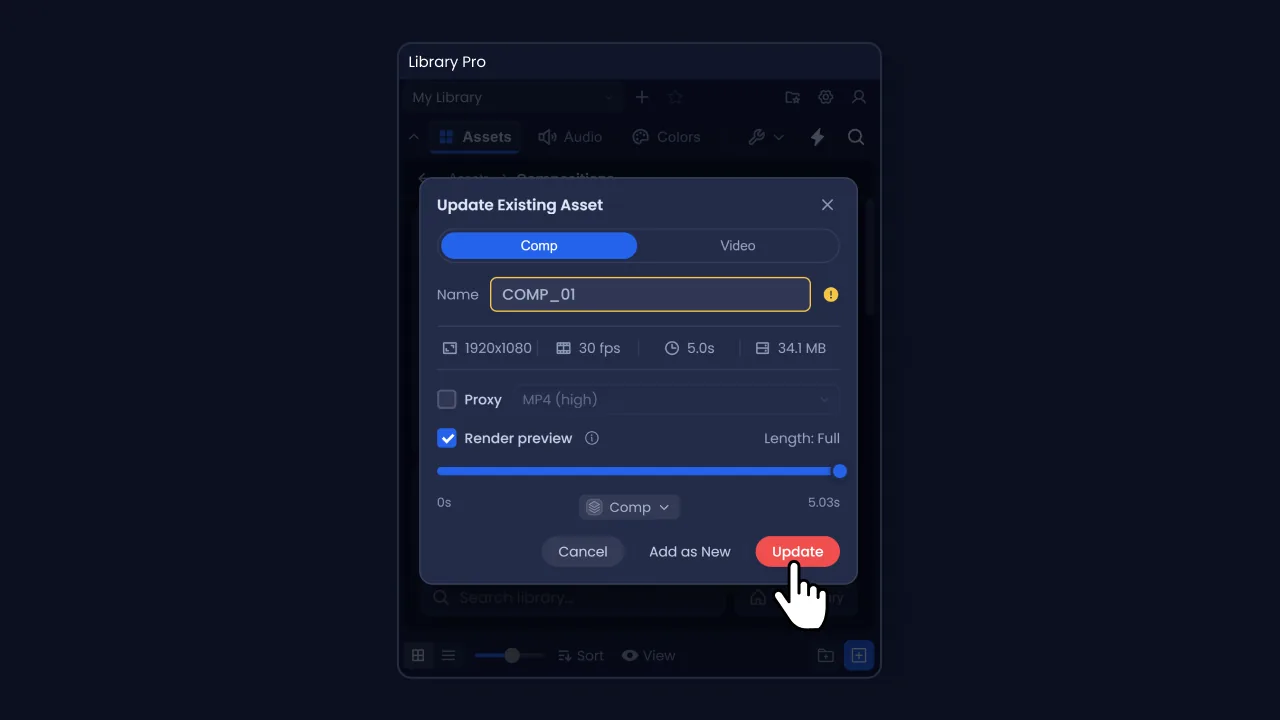
Press Export. If the name is already taken you get Update to replace the existing asset, or Add as New to keep both.
What happens while it runs
The panel covers the shelf while it works. Most comps take under a couple of minutes. Heavy ones take longer.
Your project visibly switches away and back. That's expected. The export saves your project into the library, then reopens the one you were working in.
On macOS the panel won't update until After Effects finishes rendering. There is a matching setting explained in Settings.
Only one export runs at a time.
What Library Pro saves
One card on the Assets shelf with a COMP badge and a preview that plays on hover. Behind it, the project file, the collected footage sorted into Images, Vectors, Video, Audio and 3D Models, the preview, and a small sidecar file, all in one folder.
Cinema 4D files are the exception. Because bundling them only covers the .c4d and its neighbouring tex folder, the panel asks whether to bundle it or keep pointing at your original, and keeping the original path is the safer answer.
Importing comps
Open any project, find the comp on the Assets shelf, and hover its card.
- Import to Project: brings the comp and its footage into your project panel
- Add at playhead: does the same, then drops the comp into the comp you have open, starting at the playhead
Markers come across with the comp, so comments, durations, colours and protected regions all arrive on the layer. That matters most for responsive design templates, where the protected regions are markers: without them a comp built with responsive timing stretches wrongly the moment it is placed.
Double-clicking a card opens the preview, it doesn't import. There's no dragging from the panel into After Effects.
Imported folder structure
Everything arrives inside one folder in your project panel.
- Library Pro Imports, the master folder, which you can rename in Settings
- Compositions, then a folder named after the asset
- The main comp, labelled green, selected and revealed for you
- A (Footage) folder holding everything the comp needs
After Effects expands those folders when it reveals the comp, including (Footage), and there's no way to script them closed again. You can collapse these folders manually in the project panel.
By default the footage is copied next to your project rather than left pointing at the library, so the project stays portable and moving the library later doesn't break it. Leave this on to keep projects independent of your library. With it off, imported footage links straight to the library files: the project stops being portable to another machine, moving the project breaks the links, and deleting an asset from the library breaks it in every project pointing at it.
An unsaved project has nowhere to copy to. You'll get a warning, and if you carry on the footage links to the library instead.
Proxies
If you ticked Proxy when you saved the comp, the video comes across, gets linked as the comp's proxy and switched on, so playback uses it straight away. Disable the proxy to preview the original comp.
Ticking Proxy renders the whole comp, however long your preview range is, because a proxy has to match the comp's duration to line up. It costs render time on export in exchange for faster playback while you work.
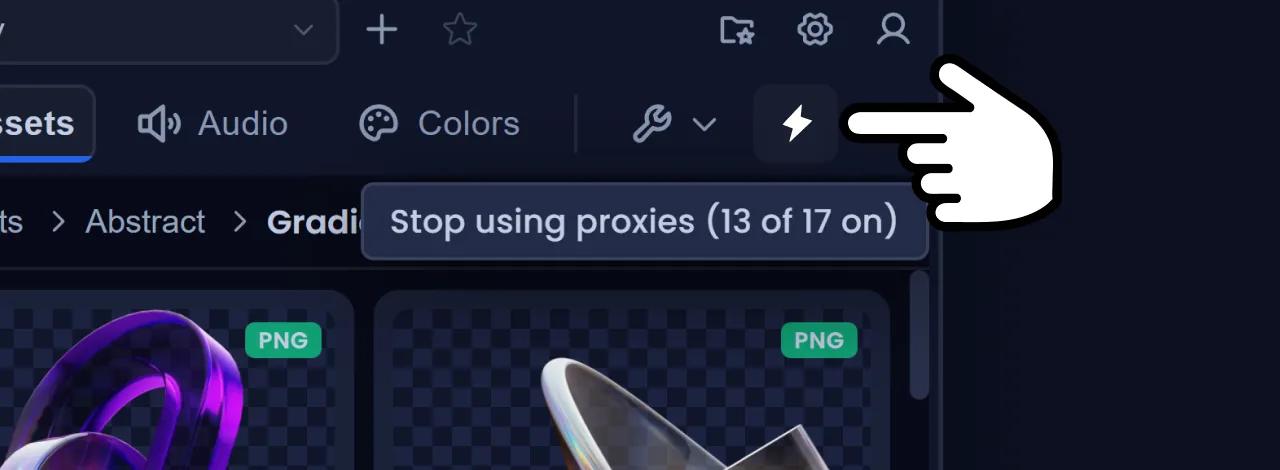
The lightning bolt in the toolbar turns every proxy in the project off and on again, and counts how many are in use.
The card's right-click menu also offers Import video only, which brings in just the movie.
Importing the same comp twice
Library Pro notices and asks. Reveal in Project takes you to the one you already have. Import Duplicate makes a separate copy, footage and all, so editing one leaves the other alone.
When a comp is already in the project, Add at playhead reuses it rather than importing again. If you want a separate copy, use Import to Project, choose Import Duplicate, then add it to the timeline yourself.
Version limits
A comp saved from a newer After Effects will not open in an older one. That's an After Effects limitation, the same as a native .aep.
Library Pro dims those assets and badges them Newer AE version, with a tooltip naming the version that made them, rather than letting you import something that fails. Video, images, vectors, audio and colours are unaffected.
Going the other way is fine. A comp made in an older version opens as a converted copy, and if you save it back the panel warns you that the older version won't open it afterwards.
Updating a comp
To change a saved comp, open it from the library, make your changes, then update it through Library Pro.
- 1
Right-click the comp on the Assets shelf and choose Edit in AE. It opens the library's own project file.
- 2
Make your changes.
- 3
Select the comp, press + and choose From After Effects. Leave the name as it is.
- 4
Because that name is taken, the dialog offers Update in place of Export. Press it.
Saving updates the project file and nothing else. The preview carries on showing the old version, and any footage you brought in goes missing the next time the comp is imported, because it was never collected into the asset. Only the update collects the footage and rebuilds the preview, so it's worth using even for a change as small as a colour.
Update replaces the asset, preview and all. Nothing is kept alongside it and there's no version history, so treat it as an edit rather than a save as. Add as New is there if you meant to keep both.
Projects you already imported this comp into carry on unchanged, because they took their own copy at import time, so an update only reaches the imports you make from here on. That holds while Copy Footage on Import is on. With it off those projects point at the library itself, so an update can change or break what they are using.
Assets
The Assets shelf holds saved comps, footage, stills, vector artwork and 3D models.
Supported formats
- Video: .mp4, .mov, .avi, .webm, .mkv, .m4v
- Images: .jpg, .jpeg, .png, .gif, .webp, .tif, .tiff, .bmp, .tga
- Vector and layered: .svg, .ai, .eps, .psd
- 3D models: .glb, .gltf, .obj, .c4d
- Templates: .mogrt, exported from After Effects
- Archives: .zip, unpacked into your library rather than kept as a file
If a format above isn't offered in the file picker, drag it in from Finder or Explorer instead.
Motion graphics templates
Add a .mogrt like any other file. The card shows its poster, and hovering plays the preview that After Effects already put inside the template, so nothing is rendered and nothing is added to your library.
Square and vertical templates show at their real shape. After Effects writes a 16:9 preview into every template whatever the comp is, and Library Pro trims the black bars off for the card. The file itself is untouched.
You can set a poster frame, the same as a video or a comp. Scrub to the frame you want and set it, and it stays with the template, so it travels if you move the asset to another library.
Import to Project and Add at playhead both work. Rename a template in Library Pro and the comp arrives in After Effects under that name, the same as everything else on the shelf.
A template has to be unpacked into your project folder, because After Effects cannot use one any other way. That happens even with Copy Footage on Import turned off, and Library Pro says so the first time it comes up in a session. It also means your project has to be saved before you can add one, since there is nowhere to unpack to otherwise.
Adding a template that is already in your project reuses the comp that is there rather than unpacking it again, so it is instant the second time. That also means a re-exported version will not replace one you have already placed. Delete it from your project first if you want the new one.
3D models
The badge on the card says GLB, GLTF or OBJ. It is worth knowing which: a GLB carries everything inside one file, while a GLTF needs its geometry and textures sitting beside it. Those come into your project with the model, including anything in a textures subfolder.
A GLB and a GLTF that share a name get separate entries, Robot and Robot (GLTF), because the format decides the entry. Models added before this update keep the names they already have.
Replacing works, and a model only ever replaces another of the same format. A model that arrives without the files it needs, such as a .gltf whose geometry could not be unpacked, is refused with a reason rather than added as a card that never finishes loading.
SVG needs After Effects 2026
Native SVG import arrived in After Effects 2026. On anything older, an SVG will store, preview and organise perfectly well in your library, but importing one into a project is refused, with a note saying why.
Adding to a comp
Hover any asset for Import to Project and Add at playhead.
That modifier is the one to remember. It replaces the source on a layer you have already animated, and the keyframes stay exactly where they were.
Layered Illustrator and Photoshop files
Importing an individual .ai or .psd asks how you want it, with three choices.
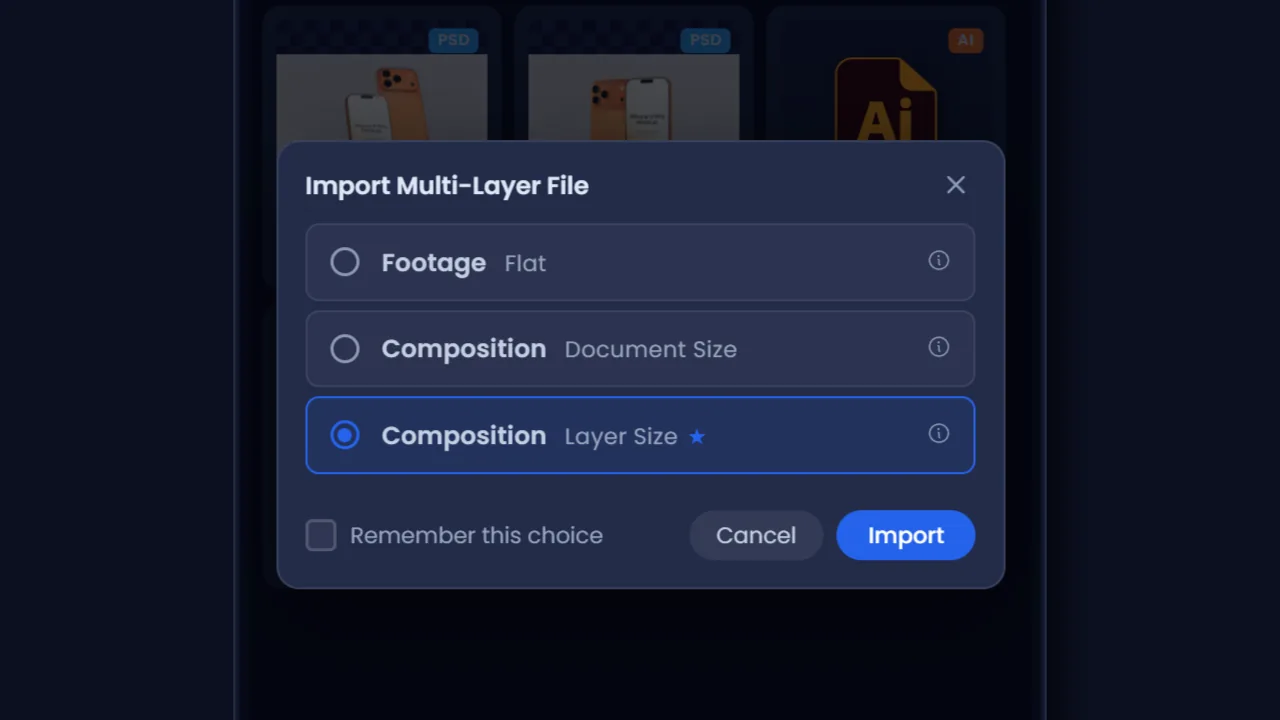
- Footage, Flat: one flat layer, for when you want it as a reference image
- Composition, Document Size: every layer as its own item in a new comp, each at the full canvas size, for when position on the canvas matters
- Composition, Layer Size: every layer cropped to its own bounds, in a new comp. This is the recommended one and the usual pick for motion work
Tick Remember this choice to stop being asked. You can change it later in Settings > Imports > Layered File Import.
A file with no real layers skips the question and comes in flat.
Layered artwork inside a saved comp is handled automatically. You won't see this window during a comp import.
Badges
Corner badges name the file type, and COMP marks a comp you saved through Library Pro as opposed to a plain AEP. Two others are worth reading.
- An amber warning triangle means the file came from outside Library Pro, so its footage was never collected and it may not open on another machine.
- A dimmed thumbnail with Newer AE version means it was made in a later After Effects than the one you're running, and can't be opened here.
Previewing
Double-click any asset for a bigger preview. Hold Shift and move the mouse across a video thumbnail to scrub it without opening anything.
Audio
Your music and sound effects in one place, ready in every project. Pull them out of After Effects or drag them in from Finder or Explorer, play them in the panel, and import only the one you want.
Takes .wav, .mp3, .ogg, .aac, .m4a, .flac, .aif and .aiff. If the file picker doesn't offer one, drag it in instead.
Audio opens in list view by default, with a waveform for each track.
Listening
Press the play button to hear a track from the start. Or click anywhere on the waveform and it plays from there, which saves sitting through a whole track to reach the part you want.
Mark played tracks tints how far through each one you got, so you can tell what you've already played. It's on by default and only lasts the session. There's a reset beside the breadcrumb to clear it sooner, or turn it off in View options if you'd rather not see it at all.
Turn Show waveforms off if you'd rather have plain rows.
Adding to a comp
Same two buttons as Assets: Import to Project, and Add at playhead. Shift-clicking Add at playhead replaces the selected layer's source.
Drop audio onto the Assets shelf by mistake and Library Pro offers to put it on Audio instead. Choose Audio to keep the file visible. Audio files sitting in the assets folder aren't displayed anywhere.
Colours
Palettes you apply straight onto layers, so you can stop digging through brand guidelines or old files for the right hex.
Adding colours
The + button adds a colour. With layers selected in After Effects it can pick their colours up for you, or you can use the picker. You can also drop a .lpcolors, .ase or .svg palette file onto the shelf.
Applying them
Select layers in After Effects and click a swatch. The fill and stroke toggle at the top decides which one you're setting, and there's a swap button between them.
The toolbar above the swatches also creates a background, a shape or a text layer in your chosen colour.
Each of those buttons has its own Shift and Alt behaviours for fill and stroke, shown in its tooltip.
Organising
Colours use folders, and unlike the other shelves you see them all at once rather than navigating into them. Right-click empty space for New Folder, or select swatches and choose Group into folder.
Folders nest four levels deep. Past that the option disappears and a move that would break the limit is refused with a note.
Each folder has its own size buttons in its header, so a group of primary colours can be larger than the rest.
Turn Show folders off and you lose the headers but fit a lot more colour on screen. Groups and subgroups keep their own lines, so you can still tell what's what.
Settings
The gear icon in the toolbar. Six tabs.
General
Default Library Location, where new libraries get created, and Additional Locations, for picking up libraries that live elsewhere. Changing the default moves nothing, it only affects what gets made next.
Imports
How files are organised and copied when they move between the library and your projects.
- AE Import Folder: the folder name Library Pro creates in your project panel. Defaults to Library Pro Imports.
- Copy Footage on Import: on. Copies assets next to your project rather than linking to the library, which keeps projects portable. Turning it off warns you properly, and you should leave it on.
- Fit Media to Comp: on. Scales images and video down to fill the comp when you add them. Doesn't touch layered files or 3D models.
- Use Video as Proxy: on. When a comp was saved with a video, link it as the proxy and switch it on.
- Collect Files to Project: Ask each time. What to do when you add a file from AE that sits outside your project folder.
- Cinema 4D Export: Ask each time. Whether to bundle a .c4d into the library or keep pointing at the original. Keeping the original is safest.
- Layered File Import: Ask each time. Sets a permanent answer to the .ai and .psd import question.
Previews
Preview Tools is where you install ffmpeg if it didn't install on first run, or if you skipped it.
Show File Extension puts the extension back on names, so Logo becomes Logo.png. Off by default. Fit 3D Models to Viewport scales a model down to fit the frame when you add it, since most are authored far too big to see.
Cache Storage shows how much space generated previews are taking on this machine, with a Clear cache button. Previews rebuild as you browse, so clearing only costs the time to regenerate them. You can move the cache to another drive, and set a limit, which defaults to 10 GB and is checked when the panel starts.
Render Preview Frames sets how many frames to show you while a comp preview renders. On macOS this is switched off and greyed out. The panel can't update while After Effects renders there, so those frames would never be seen, and skipping them keeps the render shorter.
Appearance
Four themes: Default Dark, Default Light, Midnight and Slate. The change applies as soon as you pick one.
Default Dark and Default Light match the two After Effects themes, but they don't follow After Effects on their own. Switch AE between light and dark and you'll need to change Library Pro to match. Midnight and Slate are two more dark options if you want something different.
Button Tooltips turns the hover hints on buttons on and off, and sets how long to wait before they appear. Info-icon tooltips inside dialogs stay regardless.
Support
The support address, plus a block of system information you can copy straight into an email. Include it, it saves a round trip.
A Help and docs card above the address opens this page. There are two other ways in: Read the docs in the setup window, and Need help? on the card you see on an empty library.
Support logging is below it. See Troubleshooting.
Advanced
Reset Library Pro puts the panel back to a fresh install. It signs you out, clears every preference and this machine's previews, and forgets your library locations. Your library files on disk are not touched, and you can add the locations back afterwards.
Troubleshooting
The .zxp will not install
Close After Effects first, then drag the file onto the aescripts ZXP Installer. After Effects can't install a .zxp by itself, and it can't pick up a new build while it's running.
If the panel still isn't under Window > Extensions afterwards, check your After Effects version. Library Pro needs 2020 or later.
The media tools will not download
Usually a proxy, a VPN or antivirus blocking the download. Press Try again first. If it keeps failing, use Continue with limited previews for now, and install them later from Settings > Previews once you're on a different connection.
A download that stalls rather than failing outright gives up after 20 seconds and offers you the same choices, so Preparing Library Pro cannot sit there forever with nothing to press. Try again works even after the first attempt failed.
The panel works fine without them. You just won't get generated video thumbnails or media previews.
It says the trial is locked to another machine
Library Pro runs on one machine at a time. If you need to move to another one, email support and we'll shift it across.
If it says this computer has already started a trial, sign in with the account you used the first time. The message shows part of the email address.
A library says it is unreachable
The drive is unplugged, the network share is down, or the folder was moved or renamed. Plug it back in or bring the share up and the badge clears on the next scan. If the folder genuinely moved, press Reconnect on the card and point Library Pro at its new location.
A different card, Couldn't Reach Your Libraries, means none of your locations could be read at startup rather than one library being missing. That one has a Try Again that rescans.
A library in a cloud folder that hasn't finished syncing says so separately. Wait for it, then set that folder to stay available offline so it doesn't happen again.
It will not let me rename or delete something
Something else has the file open. On Windows that's usually a File Explorer window sitting on the folder, or an After Effects project using the file. Close those, pause cloud sync if it's mid-sync, and try again.
An asset is dimmed and I cannot import it
It was made in a newer After Effects than the one you're running. The tooltip names the version. Project files don't open backwards, so the only fix is updating After Effects.
An SVG that refuses to import is the same story with a different cause: SVG support only exists in After Effects 2026.
The export seems to have frozen
On macOS the panel can't redraw while After Effects renders, so it sits still until the render finishes. Give it time. Heavy comps can take several minutes.
If it gives up and tells you the render is taking too long, the render may still be going in After Effects. Check the render queue, then try again with a shorter comp or a shorter work area.
Sending a log
If we ask for one, go to Settings > Support > Support logging. Pick how long to log for, an hour covers most things, then press Turn on and do whatever went wrong again.
Press Stop and the finished file is revealed for you. Attach it to an email, along with the system information block at the top of the same tab.
The log records errors, which actions ran and file paths inside your libraries. It never contains passwords, licence keys or the contents of your files, and nothing is sent anywhere unless you attach it yourself. It's off by default and stops on its own when the time is up.
Need help?
Email support@toolsformotion.com. There's also a Discord, and feedback about what breaks or feels wrong is exactly what we want.